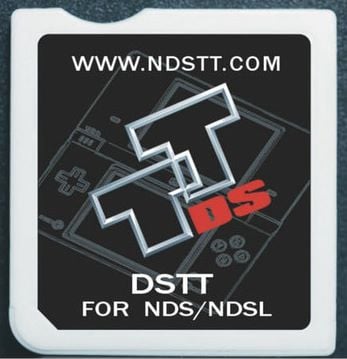
DSTT/i & Clones
ndstt.com (and many clones)
Cart Info
The DSTT and DSTTi appear to be a cut-down version of SuperCard's DSOne, with no PSRAM or RTS support, meant to be a cheaper entry in the flashcart market.
This cart is one of the most widely cloned flashcarts ever, with dozens or even hundreds of various "R4" clone carts using DSTT based hardware. The well-known r4isdhc.com Gold Pro carts are just one example of such a clone. Luckily, the clones work nearly identical to real DSTT's, so kernels can be shared between all of them.
See YSMenu Compatibility List's DSTTi-Clone YSMenu section for a full list of DSTT/i based carts.
Setup Guide:
Kernel Info
Pico-Launcher is the game menu for the DSpico (an open source DS flashcart by the LNH team) and other supported carts. Combined with Pico-Loader, it can be used as a full kernel, and supports almost all retail DS games. It features a material-inspired user interface, and an extremely fast loader.
Soft-Reset Not Supported
Note that Pico-Launcher/Loader currently does not support soft-resetting to the game menu. If this is important to you, consider using YSMenu.
-
Format the SD card you are using by following the formatting tutorial.
-
Download the latest Pico Package for DSTT.
- Currently updated to Pico-Launcher
v1.3.0and Pico-Loaderv1.7.1
- Currently updated to Pico-Launcher
-
Extract the
pico_package_DSTT.zipfile with 7-Zip, or your native file manager app. -
From within the extracted files, copy the following files/folders to your SD card root:
-
_picofolder -
_picoboot.nds -
ttmenu.dat
-
-
Some DSTTi clones load from a boot file other than
ttmenu.dat. Find your flashcart in the YSMenu compatibility list by searching the page (Ctrl+F) for the URL listed on your cart's label.- If your cart is listed as needing an extra boot file, make copies of the
ttmenu.datfile on your SD card root, then rename the copy appropriately.
- If your cart is listed as needing an extra boot file, make copies of the
-
If you'd like to be able to use cheats on your games, download a cheat database.
-
You will need the
usrcheat.datfile from the download link in the post. Copy this file into the_picofolder on your SD card. -
Create a
Gamesfolder in your SD card root, and place any.ndsgame ROMs you'd like to play inside. -
The files on your SD card should now look like this:
-
Insert the SD card back into your cart, plug the cart into your DS, and see if it boots into the menu.

Post-Setup Enhancements
Emulators
To emulate retro consoles like GBA, GB/C, NES, and others, you will need to add emulators and configure their file associations for Pico-Launcher to display retro ROMs in the menu.
Game Covers
Pico-Launcher supports showing game covers in cover flow layout mode, and on the top screen in icons mode. You will need to add cover images to your SD card to use this feature.
PicoCover TwilightBoxart PicoDex
To create your own custom covers for Pico-Launcher, check out the cover creator. Save each cover in the _pico/covers/user folder on your SD card, named after its ROM file plus .bmp (for example, MyGame.nds.bmp).
Themes
Looking to customize your DSpico interface? Check out the Pico themes repository:
To create your own custom themes for Pico-Launcher, check out the themes creator:
Kernel Info
AKMenu-Next is an alternative kernel based on akmenu4 (used in Wood R4 and AKAIO) and uses Pico-Loader (and optionally nds-bootstrap) to load games. This is an option if you prefer the Wood UI and it's themes over Pico-Launcher.
Soft-Reset Not Supported for Pico-Loader
Note that Pico-Loader inside AKMenu-Next currently does not support soft-resetting to the game menu. If this is important to you, consider using YSMenu or using the nds-bootstrap loader within AKMenu-Next.
-
Download the latest release of AKMenu-Next Flashcart Edition.
-
Extract the downloaded
akmenu-next-flashcart.zipfile with 7-Zip. -
From within the akmenu-next files, copy the following files/folders to your SD card root:
_ndsfolder_picofolderBOOT.NDS
-
Go into the
Autobootfolder and then go into theDSTTfolder. CopyTTMenu.datto your SD card root. -
Some DSTTi clones load from a boot file other than
ttmenu.dat. Find your flashcart in the YSMenu compatibility list by searching the page (CTRL+F) for the URL listed on your cart's label.- If your cart is listed as needing an extra boot file, make copies of the
ttmenu.datfile on your SD card root, then rename the copy appropriately.
- If your cart is listed as needing an extra boot file, make copies of the
-
Download the latest release of Pico-Loader for DSTT.
-
Extract the downloaded
Pico_Loader_DSTT.zipfile with 7-Zip. -
Copy the contents of the files from the extracted
Pico_Loader_for_DSTT.zipfile to the_picofolder on your SD card. -
If you'd like to be able to use cheats on your games, download a cheat database.
-
You will need the
usrcheat.datfile from the download link in the post. Copy this file to_nds/akmenunext/cheats/on your SD card. (Create thecheatsfolder if it doesn't exist) -
Create a
Gamesfolder in your SD card root, and place your.ndsgame ROMs inside. You can also create additional folders to help with organizing/categorizing your ROMs. -
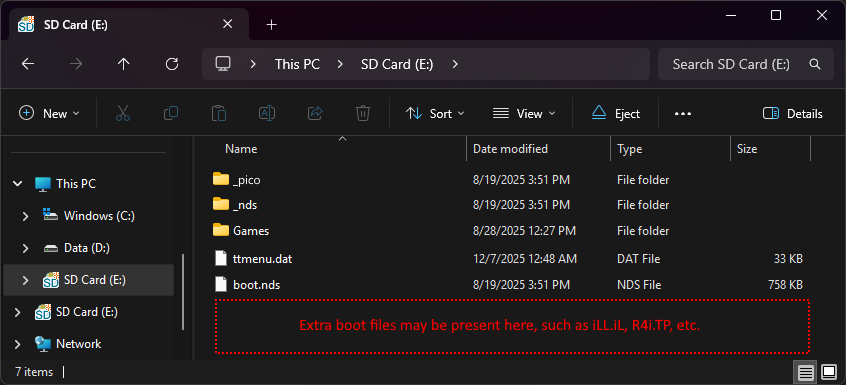
The files on your SD card should now look like this:
-
Insert the SD card back into your cart, plug the cart into your DS, and see if it boots into the menu.
nds-bootstrap installation (Optional)
-
Download the latest release of nds-bootstrap.
-
Extract the downloaded nds-bootstrap.zip file with 7-Zip.
-
Copy the contents of the files from the extracted
nds-bootstrap.zipfile to the_ndsfolder on your SD card. -
In AKMenu-Next, press
Startand go toSettings. Go to theOther Settingstab and change theGame Loadertonds-bootstrap.
Post-Setup Enhancements
Plugins
To emulate retro consoles like GBA, GB/C, NES, and others or to play media such as videos, you will need to add plugins to AKMenu-Next:
Game Covers
AKMenu-Next can show game covers on the top screen. To use them, select one of the included cover themes: Blue Skies Game Covers, DSpico Game Covers or Starlight Covers. Then add cover images to your SD card. Covers made for Pico-Launcher work too.
To create your own custom covers, check out the cover creator. Save each cover in the _nds/covers_name folder on your SD card, named after its ROM file without .nds (for example, MyGame.bmp).
Themes
Looking to customize your AKMenu-Next interface? Check out the AKMenu themes repository:
AKMenu-Next is also backwards compatible with Acekard/Wood R4 themes, you can find them here:
Kernel Info
YSMenu is a simple, fast, and stable kernel, featuring a menu UI resembling the original R4. It's a great choice for most DSTT-based flashcart users, and has near-perfect compatibility with unmodified retail DS roms.
Note that YSMenu has issues with some romhacks - the loader will not recognize the romhack in its patch database, causing it to throw errcode -4 when attempting to load it.
-
Format the SD card you are using by following the formatting tutorial.
-
Download the RetroGameFan YSMenu 7.06 kernel.
-
Extract the YSMenu .7z file you downloaded using 7-Zip, then go into the
DSTTi-Clone YSMenufolder. -
From this folder, copy the following files/folders to your SD card root:
-
Gamesfolder -
TTMenufolder -
TTMenu.dat
-
-
Some DSTTi clones load from a boot file other than
TTMenu.dat. Find your flashcart in the YSMenu compatibility list by searching the page (CTRL+F) for the URL listed on your cart's label.-
If your cart is listed as needing an extra boot file, make copies of the
TTMenu.datfile on your SD card root, then rename the copy appropriately. -
Note that in all cases,
TTMenu.datstill needs to be on your SD for soft-reset to function. Do not remove it.
-
-
Place any
.ndsgame ROMs you'd like to play into theGamesfolder. -
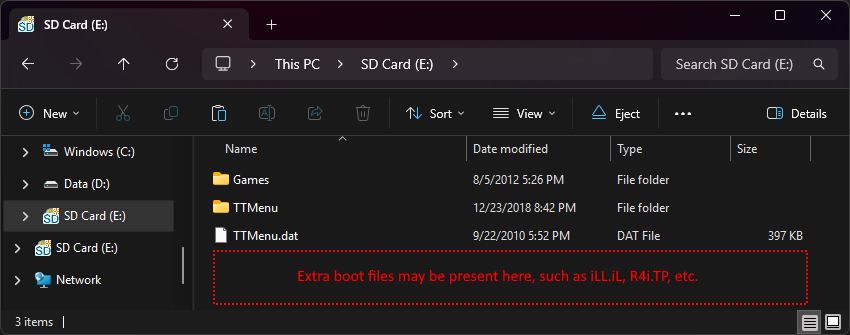
The files on your SD card should now look like this:
-
Insert the SD card back into your cart, plug the cart into your DS, and see if it boots into the menu.
Post-Setup Enhancements
Emulators
To emulate retro consoles on your DS like GBA, GB/C, NES, and others, you will need to download emulators.
Themes
Looking to customize your menu? Check out the YSMenu themes repository: