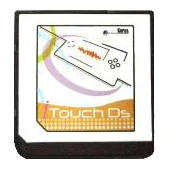
iTouchDS
itouchds.com
Cart Info
These carts are made by the same team as the M3 DS Real cart. They advertised RTS support in their stock kernel, similar to the M3's RTS support in its Sakura kernel. As the cart is M3 hardware at the end of the day, it's compatible with M3 loaders such as M3DS YSMenu and M3DS Pico-Launcher. Thanks to LifeHackerHansol's work on M3DS flashcart-bootstrap, the iTouchDS now has a way to autoboot both of these kernels.
Setup Guide:
Kernel Info
Pico-Launcher is the game menu for the DSpico (an open source DS flashcart by the LNH team) and other supported carts. Combined with Pico-Loader, it can be used as a full kernel, and supports almost all retail DS games. It features a material-inspired user interface, and an extremely fast loader.
Soft-Reset & RTS Not Supported
Note that Pico-Launcher/Loader currently does not support soft-reset. If this features is important to you, consider using YSMenu.
RTS is only supported on the stock kernel, provided at the bottom of the page.
-
Format the SD card you are using by following the formatting tutorial.
-
Download the latest Pico Package for M3DS Real.
- Currently updated to Pico-Launcher
v1.3.0and Pico-Loaderv1.7.1
- Currently updated to Pico-Launcher
-
Extract the
pico_package_M3DS.zipfile with 7-Zip, or your native file manager app. -
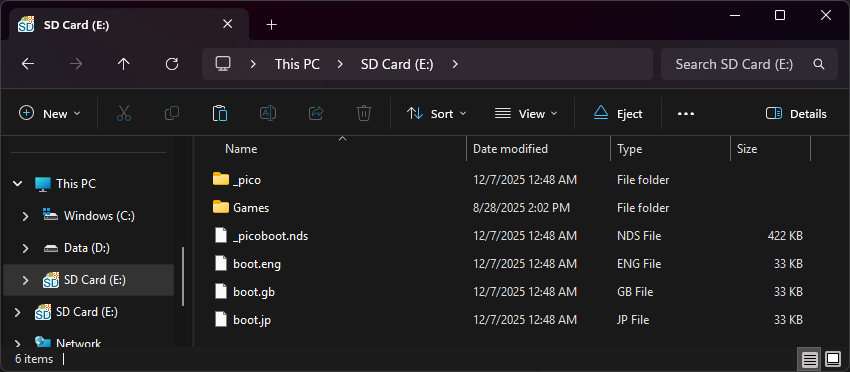
From within the extracted files, copy the following files/folders to your SD card root:
-
_picofolder -
_picoboot.nds -
boot.eng -
boot.gb -
boot.jp
-
-
If you'd like to be able to use cheats on your games, download a cheat database.
-
You will need the
usrcheat.datfile from the download link in the post. Copy this file into the_picofolder on your SD card. -
Create a
Gamesfolder in your SD card root, and place any.ndsgame ROMs you'd like to play inside. -
The files on your SD card should now look like this:
-
Insert the SD card back into your cart, plug the cart into your DS, and see if it boots into the menu.
Post-Setup Enhancements
Emulators
To emulate retro consoles like GBA, GB/C, NES, and others, you will need to add emulators and configure their file associations for Pico-Launcher to display retro ROMs in the menu.
Game Covers
Pico-Launcher supports showing game covers in cover flow layout mode, and on the top screen in icons mode. You will need to add cover images to your SD card to use this feature.
PicoCover TwilightBoxart PicoDex
To create your own custom covers for Pico-Launcher, check out the cover creator. Save each cover in the _pico/covers/user folder on your SD card, named after its ROM file plus .bmp (for example, MyGame.nds.bmp).
Themes
Looking to customize your DSpico interface? Check out the Pico themes repository:
To create your own custom themes for Pico-Launcher, check out the themes creator:
-
Format the SD card you are using by following the formatting tutorial.
-
Download the iTouchDS YSMenu 7.06 package.
-
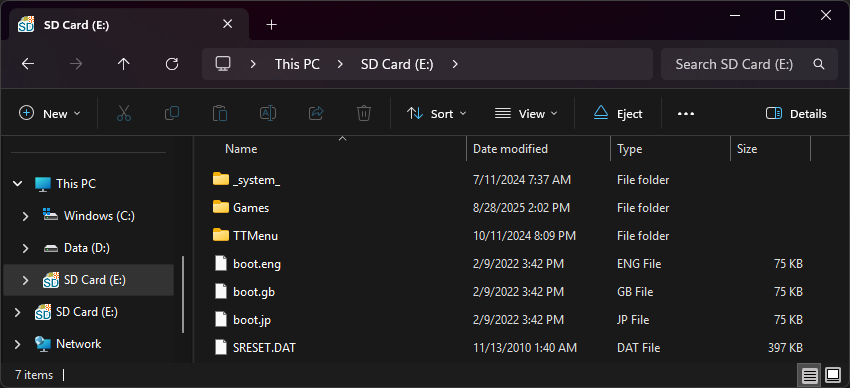
Next, extract the contents of the downloaded kernel zip to your SD card.
-
Place any
.ndsgame ROMs you'd like to play into theGamesfolder. -
The files on your SD card should now look like this:
-
Insert the SD back into the cart, plug the cart into the DS, and see if it boots into the menu.
Post-Setup Enhancements
Emulators
To emulate retro consoles on your DS like GBA, GB/C, NES, and others, you will need to download emulators.
Themes
Looking to customize your menu? Check out the YSMenu themes repository:
Tip
If you'd like to use RTS (Real-Time-Save), you can also use the cart's stock kernel, provided below. Do keep in mind though that game compatibility won't be as good as YSMenu or Pico-Launcher, and the RTS feature itself can be hit-or-miss.